
Download New Tab Page – Free Firefox Extension for a Smarter New Tab
Overview
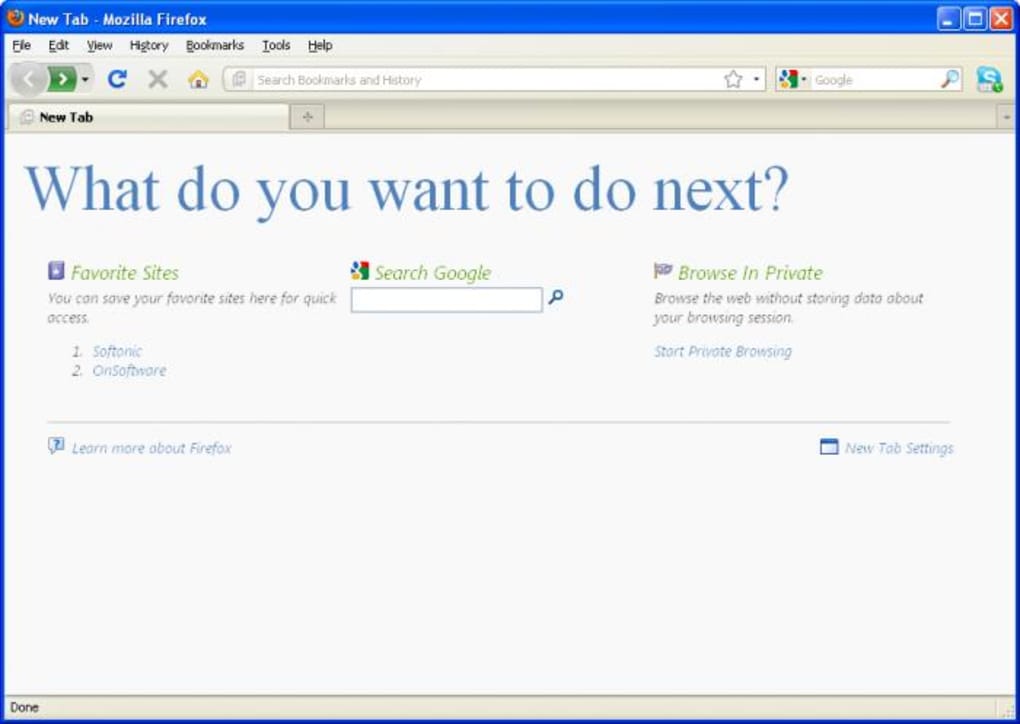
If you’re a frequent Firefox user, you’ve probably noticed how the default new‑tab page feels like a blank canvas that does very little to boost productivity. New Tab Page is a lightweight, free Firefox add‑on that transforms that empty space into a functional hub. Instead of staring at an empty page, you are greeted with a concise “What do you want to do next?” prompt, a list of your favorite sites, an embedded Google search bar, and a one‑click shortcut to private browsing mode.
The extension is designed with simplicity in mind: it replaces the default tab without adding unnecessary bloat, ensuring fast load times and a secure browsing experience. While the feature set is intentionally minimal, the core idea is to give you instant access to the tools you use most, directly from the moment you open a new tab. This approach can shave seconds off daily navigation, reduce the need to open additional windows, and keep your workflow centered within Firefox.
For users who value speed, privacy, and a clean interface, New Tab Page offers a subtle yet effective upgrade to the default Firefox experience.
Key Features
- Customizable Favorite Sites – Add, edit, or remove URLs to create a personal quick‑launch bar that mirrors your most visited pages.
- Integrated Google Search – Perform web searches without leaving the new tab, saving time and clicks.
- One‑Click Private Browsing – Instantly switch to Firefox’s private mode with a single button, enhancing privacy on the fly.
- Minimalist Design – A clean, distraction‑free layout that loads instantly and does not interfere with other extensions.
- Auto‑Update Support – The add‑on receives regular, secure updates through Firefox’s extension marketplace.
- Free & Open Source – No hidden fees, no subscription, and the source code is available for community review.
The simplicity of these features is intentional. By focusing on the three most common actions—visiting favorite sites, searching the web, and entering private mode—New Tab Page eliminates the noise that often clutters other new‑tab extensions. Users can also benefit from the built‑in synchronization with Firefox Sync, meaning your favorite site list follows you across devices, provided you are signed into your Firefox account. While some power users may crave additional widgets such as weather, to‑do lists, or RSS feeds, the developer has prioritized speed and security, ensuring that the extension never slows down the browser start‑up time. Future updates are expected to introduce optional modules, but the core experience remains a fast, secure, and highly usable new‑tab replacement.
Installation & Usage Guide
Getting New Tab Page up and running is straightforward. Follow these steps for a smooth installation:
- Open Firefox and navigate to the New Tab Page add‑on page on Mozilla’s official Add‑ons site.
- Click the “Add to Firefox” button. Firefox will prompt you to confirm the permissions required (mainly the ability to modify the new‑tab page and access your browsing history for the favorite sites list).
- After granting permission, the extension will download and automatically install. You’ll see a brief notification confirming that “New Tab Page” is now active.
- Open a new tab to view the default layout: a prompt, your favorite sites bar (initially empty), a Google search field, and a private‑browsing icon.
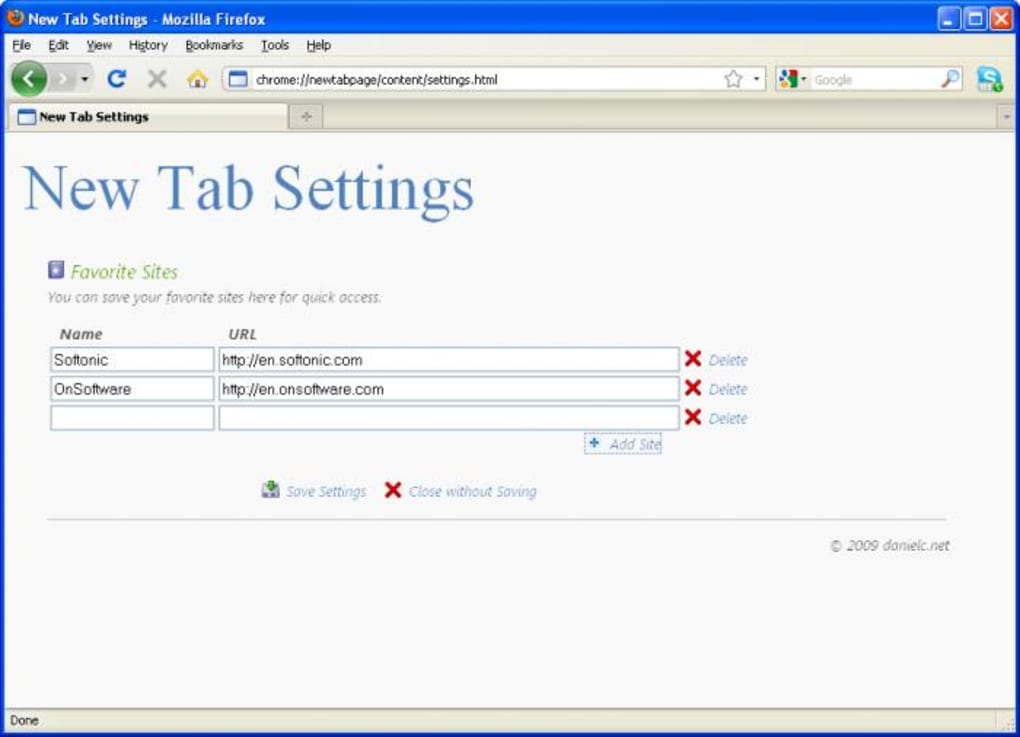
- To customize the favorite sites, click the gear icon at the top‑right of the new‑tab page. A small modal will appear where you can add URLs, assign custom titles, and reorder the list via drag‑and‑drop.
- Changes are saved instantly and synchronized with Firefox Sync if you have it enabled, so your list appears on any other device where you’ve installed the extension.
- Use the embedded Google search bar just like the standard Google homepage—type a query and press Enter. Results open in the current tab, preserving your new‑tab workflow.
- To launch private browsing, simply click the masked “Incognito” icon. Firefox will open a new private window while keeping the new‑tab layout intact.
Maintenance is minimal. The add‑on automatically checks for updates each time Firefox restarts. If an update is available, you’ll receive a discreet prompt to install it, ensuring you always have the latest security patches and feature enhancements. Should you ever need to remove the extension, go to Menu → Add‑ons and Themes → Extensions**, locate “New Tab Page,” and click “Remove.” The original Firefox new‑tab page will be restored instantly.
Compatibility, Pros & Cons
New Tab Page is built specifically for the Firefox browser on desktop platforms, including Windows 10/11, macOS 10.14+, and Linux distributions that support Firefox. The extension works with both the standard release channel and the ESR (Extended Support Release) version of Firefox. Mobile Firefox does not currently support this add‑on, as the mobile UI limits new‑tab customizations.
Pros
- Fast, lightweight, and does not impact browser performance.
- Fully customizable list of favorite sites, synced via Firefox Sync.
- Integrated Google search saves a step in the browsing workflow.
- One‑click private browsing improves privacy without navigating menus.
- Free, open‑source, and receives regular security updates.
Cons
- Limited to basic features; no weather, notes, or RSS widgets.
- Only available on desktop Firefox; no support for mobile browsers.
- Customization UI is minimal; power users may desire more granular controls.
- Relies on Google for search, which may not suit privacy‑focused users.
Overall Rating: 4 out of 5 stars
The extension excels at turning an otherwise empty new‑tab page into a functional dashboard. Its simplicity is both its greatest strength and its most noticeable limitation. For everyday Firefox users seeking a quick shortcut to favorite sites and a search bar, New Tab Page delivers a secure and speedy experience. Users looking for richer customization may need to supplement it with other extensions.
FAQ
Can I add more than three favorite sites?
Yes. The favorite sites bar can hold as many entries as you like. They will appear in a horizontal scroll layout if the screen width is insufficient, ensuring every link remains accessible.
Does New Tab Page collect any personal data?
No. The extension only stores the URLs you manually enter and does not transmit browsing data to third parties. The embedded Google search uses Google’s standard search endpoint, which operates under Google’s privacy policy.
Will the extension work with Firefox’s Quantum (Quantum‑based) versions?
Absolutely. New Tab Page is compatible with all current Firefox releases that use the Quantum engine, including the ESR branch.
Can I replace the Google search bar with another search engine?
At the moment the built‑in search field is fixed to Google. However, you can change Firefox’s default search engine in the browser settings, and the new‑tab search will follow that choice in future updates.
Is there a way to import my favorite sites from bookmarks automatically?
The current version does not include an automatic import feature. Users must manually add URLs, but the developer has indicated this is a planned enhancement for a later release.
Conclusion & Call to Action
New Tab Page offers a focused, secure, and free solution for anyone who wants their Firefox new‑tab experience to do more than display a blank canvas. By integrating a customizable favorites bar, a built‑in Google search field, and instant private‑browsing access, the add‑on streamlines everyday browsing tasks without compromising speed. While power users may miss advanced widgets, the extension’s lightweight design ensures that it never drags down performance—a critical factor for modern browsers. If you value a tidy interface, quick access to your most visited sites, and a reliable search shortcut, download New Tab Page today and transform every new tab into a productivity boost.







